


We may earn a commission through these partner links. Demo funds are virtual; access and country eligibility depend on the platform terms. Disclosure
Pocket Option verification means confirming the account owner’s details through the provider’s requested checks. Email confirmation, identity approval, address evidence and payment ownership are different tasks. Start with the requirement shown in your own account, then prepare genuine documents and retain the review outcome.
Public-source research updated 23 October 2026. Original preparation examples; no identity documents submitted and no account-verification test performed.
Pocket Option verification documents: compare the request with the policy
The Payment Policy, section 2, describes identity-document scans/photos, a complete copy including photo and personal details, and possible additional payment or bank evidence. It separates web registration from identity verification. Read the actual task before deciding which pages to send.
The AML/KYC Policy, paragraphs 10–12, mentions passport, driving licence or national ID, address evidence, possible notarised copies and an ID-held-near-face photograph in some cases. It distinguishes request-triggered verification from full name/address checks connected with bank transfers and requires genuine registration-data changes to be reported.
These are provider descriptions, not a declaration that every customer must upload the same package. If a document type or upload requirement is unclear, ask for clarification before exposing extra records. Do not send an entire financial history when a narrower document would answer the stated request.
| Task to clarify | What to compare | What not to assume |
|---|---|---|
| Identity | Legal name, date of birth, valid document and required pages. | That email confirmation completes KYC. |
| Residence | Named person, current address and stated age limit for the evidence. | That an identity card always proves the current address. |
| Payment ownership | Account holder and the original funding record. | That a transfer receipt proves ownership of every destination. |
| Selfie or live capture | The exact instructions inside the genuine account. | That an old recovery selfie fits a new task. |
How long does Pocket Option verification take?
The Payment Policy’s clause 2.3 describes ten business days from the company’s request, with an extension to 30 working days in some cases. By contrast, the provider’s verification tutorial contains shorter 24-hour and 48-hour descriptions for different stages. Neither is our measured turnaround.
Keep the distinction visible: a stage estimate and an overall identification period are not interchangeable. Ask which task the estimate covers, when the clock begins and whether missing information has interrupted the review. Do not promise instant approval merely because one tutorial uses a short timeframe.
Our recommended log has four dates: request received, complete package submitted, receipt acknowledged and decision received. These dates help locate a delay. If the account displays another estimate, save that screen with its date and ask support how it relates to the published policy.
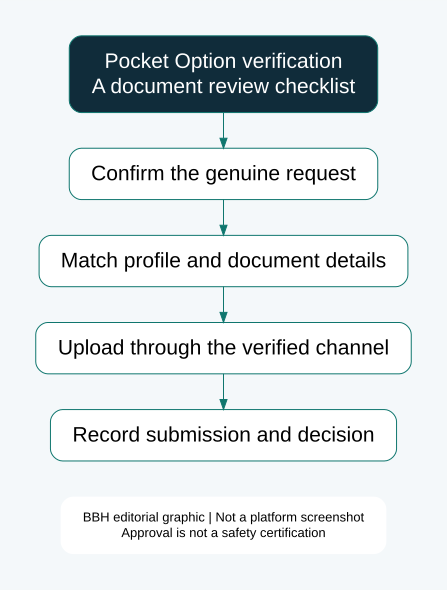
How to verify a Pocket Option account: preparation workflow
- Verify the destination first. Open the trusted account address independently. Do not begin with a link from an unsolicited “withdrawal approved” message.
- Read the assigned task. Note the requested document, accepted types, required sides/pages, expiry conditions and upload instructions. Interface labels can change.
- Compare the profile. Check the genuine name, date of birth and residence information against the records. If the profile is wrong, request the authorised correction process.
- Prepare a clear original capture. Put the document on a plain surface, avoid glare and check that required edges and text are visible. Read the saved file before uploading.
- Follow the upload limits displayed. Use the accepted format and size. This research did not inspect a live KYC form, so it does not invent a universal megabyte limit.
- Complete any separate capture task. A document upload and a face check can be separate. Follow only the instructions served through the verified account.
- Retain the acknowledgement. Record the task name, date, timezone and ticket number. A local file on your device is not evidence that the upload reached the provider.
- Check the actual decision. Distinguish pending, additional-information requests, rejection and approval. Keep the reason when a replacement is requested.
This workflow explains the checks worth making; it is not a screenshot-by-screenshot account test. Do not create an extra account to obtain another upload button or bypass a restriction.
Pocket Option verification rejected: diagnose the actual problem
| Issue shown or suspected | Practical check | Useful corrective enquiry |
|---|---|---|
| Blur or glare | Can you read every required field in the saved original? | Which field is unreadable? |
| Cropped document | Are the required sides and corners included? | Is a complete recapture needed? |
| Name mismatch | Compare genuine names and transliteration across records. | What evidence supports a profile correction? |
| Address evidence rejected | Check named person, address and document date. | Which legitimate alternative is accepted? |
| Payment owner differs | Compare funding-account ownership with the profile. | What review process applies to the discrepancy? |
| Unclear rejection | Preserve the exact message and task reference. | Which requirement failed, and what would satisfy it? |
These are troubleshooting possibilities, not confirmed reasons for any particular customer’s rejection. Improve the evidence that failed rather than uploading the same file repeatedly. A clearer picture cannot fix an incorrect legal name.
Illustrative case: an account uses a shortened first name, while the passport uses the full legal name. Rescanning the passport at a higher resolution leaves the mismatch unchanged. The useful next step is a written profile-correction request supported by genuine records, not an edited passport image.
Selfie verification and camera problems
The provider tutorial describes a face-capture stage and asks for an unobstructed face and clear images. Follow the exact live prompts where offered. A stored portrait, a filtered image and a fresh live capture are different forms of evidence.
For a camera error, first distinguish device access from identity rejection. Check whether the trusted site has camera permission, whether another application is using the camera and whether the task offers a supported device alternative. Do not install an unknown “verification helper” or let a stranger control the screen.
If capture succeeds but the check fails, retain the error wording. Ask whether the issue concerns lighting, image quality, required pose, document pairing or another stated criterion. Do not use face-swapping, another person’s face or a modified document.
Proof of address and payment-card verification
The tutorial gives examples such as bank statements and utility bills and describes a three-month recency condition for address evidence. Confirm what your assigned task accepts, including language and account ownership. A bill in a family member’s name may not answer a request for evidence bearing your own name.
Before sending a card image, confirm the specific masking instructions through the genuine account. Never provide a PIN or CVV to a support caller. Ask which digits and ownership fields must remain visible; do not improvise by uploading an unnecessarily exposed card or by hiding fields the task expressly needs.
If the physical card has been replaced, explain that fact and request the documented alternative. Do not substitute somebody else’s card or invent a receipt. Keep the original deposit reference available for the review.
Pocket Option verification pending: a precise follow-up
Verification task [reference] was requested on [date] and submitted on [date/time/timezone]. The current status is [status]. Please confirm receipt of the complete package, identify any missing or rejected item, explain the applicable review period and tell me the approved correction route. I have preserved the submission acknowledgement.
Use a ticket reference and a concise chronology. Avoid posting identity records in public comments to attract attention. When escalating, distinguish an unanswered question from a final refusal and preserve both the requirement and your response.
Does KYC approval release a pending withdrawal?
Identity approval and a payment release are separate events. After approval, check the withdrawal request itself and ask whether any other task remains. Track the transfer reference and destination credit using our Pocket Option withdrawal guide.
Approval also does not establish the provider’s solvency, local authorisation or future performance. For the broader assessment, read the Pocket Option review and broker safety checklist.
Pocket Option verification FAQs
What is the document ID?
It is the identifier on the identity document requested by the task, not your trading-account password. If the form is ambiguous about which number it needs, clarify before entering extra personal data.
Can I use Aadhaar, PAN or another Indian document?
This review did not test acceptance of individual Indian documents. A broad reference to national ID does not prove every Indian document is accepted for every task. Check the account’s current list and any masking instructions.
Can I withdraw without verification?
Do not rely on a universal exemption. The applicable request, funding route and current terms need to be checked for your own account. A social-media claim does not remove a document requirement.
Is there a fee to get verified faster?
We have not verified a paid fast-track service. Independently check any payment demand through the genuine account. A payment to a stranger is not proof that a document review will be approved.
Does a verified account mean trading is legal in my country?
No. Identity acceptance and legal permission are separate questions. See the India research guide where relevant and verify current official notices.
Sources and research scope
Checked 23 October 2026: Payment Policy, section 2, AML/KYC Policy and provider verification tutorial. The source descriptions are not independently tested approval results. Illustrations and troubleshooting examples are editorial explanations.
Explore the payments and KYC research hub and our research methodology. No personal documents were collected for this article.
Risk: Fixed-outcome contracts can lose the entire stake. Completing KYC does not guarantee payment, investment safety or profit.