


We may earn a commission through these partner links. Demo funds are virtual; access and country eligibility depend on the platform terms. Disclosure
Remote-access software can expose everything visible or controllable in a session. A caller claiming to fix a trading account should not receive that access simply because they know the broker’s name.
Understand the access being requested
Screen sharing can reveal balances, email, identity documents and authentication prompts. Remote control may let another person interact with those services using the owner’s active session.
CISA and the FTC describe misuse of legitimate remote-access tools in malicious support activity. The software can be genuine while the person requesting access is not.
Separate diagnosis from account control
A support question about a withdrawal reference or error message can often be investigated through a ticket and redacted screenshot. That does not automatically justify full access to a device.
Ask what exact information is required and why. An explanation that merely repeats ‘security verification’ is not enough to establish the need for broad control.
Sensitive actions to keep outside a stranger’s session
| Action | Exposure |
|---|---|
| Opening email | Password reset and personal records |
| Displaying authentication codes | Account access |
| Opening a bank or wallet | Payment control and financial data |
| Showing recovery phrases | Potential control over crypto assets |
| Uploading documents | Identity information |
Verify the organisation independently
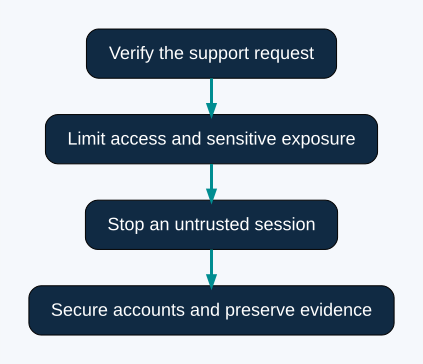
End an unexpected call and open the genuine provider’s support route. Ask whether the request is real and whether a less intrusive process is available.
Do not treat caller ID, a company badge in a video call or knowledge of your name as sufficient proof. Data from an earlier leak or public profile can make an impostor sound informed.
If remote access has already been granted
Stop the session and disconnect the tool using a trusted process. From a trusted device, secure affected accounts and review unauthorised changes or payments. Seek reputable technical help if the device’s security is uncertain.
Preserve the software name, caller details, time, visible actions and payment records. Do not let another unsolicited ‘recovery technician’ repeat the same access request.
Keep the conclusion proportionate
Not every legitimate remote-support session is malicious. The risk comes from the identity, scope and purpose of the access, especially around financial services.
A broker’s genuine status would not make an unrelated caller trustworthy. Verify the person and process separately, minimise what is exposed and use official channels for any resulting complaint.
Screen viewing and remote control expose different capabilities
A view-only session can still disclose private information visible on the screen. A control session can additionally allow interaction with open applications. Depending on the tool and configuration, other functions may include file transfer, clipboard sharing or unattended access. Check the actual permissions rather than assuming every support product behaves identically.
A recognised software brand establishes the tool’s identity, not the caller’s authority. A legitimate installer can be misused. Conversely, the presence of remote-support software alone does not prove a device has been compromised. The relevant questions are who requested access, what was permitted and what happened during the session.
A fictional withdrawal-support example
A trader posts publicly that a withdrawal is delayed. A person using the broker’s logo replies and claims that remote control is required to clear the payment queue. The person asks the trader to open email, sign in to a bank and approve a phone prompt while connected.
The public complaint explains how the caller learned about the withdrawal; it does not verify employment. Record the claim, end the unsolicited contact and open the provider’s genuine support route independently. Ask whether the existing ticket requires any device access and what less intrusive evidence would answer the question. A transaction reference and redacted error message may be sufficient for an initial investigation.
Questions before any verified support session
| Question | What to establish |
|---|---|
| Who initiated contact? | A known ticket or an unexpected approach |
| Who is the technician? | Identity confirmed through the genuine organisation |
| What problem is being diagnosed? | A specific error and the evidence needed |
| What can the tool do? | Viewing, control, transfer and persistence permissions |
| How does access end? | Session termination and any continuing access setting |
If a legitimate session is necessary, close unrelated financial pages and sensitive documents first. Prefer the narrowest supported access that answers the question. Keep control of authentication and payments yourself. Stop if the technician changes the task to opening a wallet, moving money or displaying recovery secrets.
A “safe account” transfer is not device diagnosis
The FTC describes support impersonation that escalates into instructions to move funds supposedly to protect them. In a trading context, treat an instruction to transfer money to a newly supplied wallet or account as a separate financial request. Remote access does not establish the recipient’s ownership, legitimacy or entitlement to funds.
Do not rely on a balance displayed by the caller as independent evidence of a refund or reversal. Verify completed movements through genuine account and payment-provider records. A convincing demonstration inside a session can still omit the facts needed to establish what actually happened.
If the session has already occurred
- End the remote session and stop further access. If control cannot be stopped reliably, disconnect the affected device from the network.
- Use a separate trusted device to contact genuine providers and secure affected accounts.
- Review available session controls, recovery details and transaction records for unauthorised changes.
- Contact the payment provider promptly if a payment was made or payment details were exposed.
- Use reputable technical help to assess the device and remove unauthorised access. Merely closing a window does not establish that continuing access is disabled.
- Preserve the timeline, tool name, communications and relevant payment references without delaying containment.
These steps organise a response; they cannot certify that the device is clean or guarantee recovery. Describe the access honestly to the verified technician. Avoid accepting a second unsolicited recovery offer that repeats the original request.
Frequently asked questions
Is sharing only my screen harmless?
No. Viewing can expose identity documents, balances, login prompts or recovery material even without mouse control. Close sensitive content and verify the recipient first.
Does uninstalling the tool solve every problem?
No. Exposed credentials, changed recovery settings or other installed software may require separate action. Seek technical assessment if the device’s state is uncertain.
Can I trust a caller who quotes my ticket number?
A ticket number is useful context, not conclusive identity proof. Confirm the interaction through a genuine support route you opened independently.
What records support a complaint?
Keep contact details, session times, software information, observed actions and payment references. Our payment evidence guides help separate an access incident from a disputed transaction. Reporting and recovery processes depend on your location and provider.
Sources and research scope
- CISA guide to securing remote-access software
- FTC tech-support scam guidance
- Microsoft: tech-support scam protection and response
Public-source review: 24 October 2026. Examples are illustrative. Documentary research does not represent funded-account testing. Rules must be checked against the current product, entity and customer location.
Related research
Account security research · Research methodology · Calculation tools
Risk: Fixed-outcome contracts can lose the entire stake. No chart pattern, calculator or demo result guarantees future returns.