


Two-factor authentication adds a separate login check, but it does not make every login prompt genuine. Secure the email and recovery process as carefully as the trading-account password.
Know which protection is actually offered
A password plus another independent factor is different from entering the same secret twice. Providers may offer authenticator codes, security keys, passkeys, SMS or other methods; availability must be checked in the genuine account.
CISA recommends stronger, phishing-resistant authentication where available. This is an account-security principle, not a claim that a particular broker currently supports every method.
Set it up from a trusted session
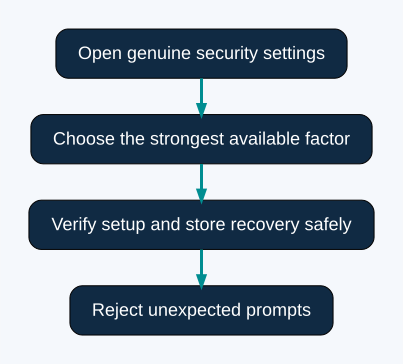
Navigate to the genuine site directly, inspect the security settings and follow the provider’s current instructions. Do not begin from an unsolicited message saying that your account must be ‘revalidated’ immediately.
After setup, confirm the method works before ending the trusted session. Preserve the recovery information privately in a secure place separate from the device that generates the login code.
Plan for losing the phone
| Dependency | Recovery question |
|---|---|
| Authenticator device | What if it is lost or replaced? |
| Recovery codes | Where are they stored securely? |
| Email account | Can it be recovered independently? |
| Phone number | Is it current and controlled by you? |
| Support route | How is identity verified for a reset? |
Do not publish recovery codes or store them in a screenshot visible to a support caller.
A code can still be phished
A fake login page can ask for both password and a current code. An attacker may also trigger approval prompts and pressure the owner to accept them. Reject an unexpected request instead of approving it to make the notifications stop.
A genuine support interaction should not require you to read out a login code so an agent can enter your account. Verify unusual requests through an independent trusted route.
Secure the surrounding accounts
An email inbox can be the recovery path for the trading account. Reused passwords or an exposed email session can weaken an otherwise careful setup.
Review unfamiliar sessions and connected applications using genuine settings. Keep device software current and avoid giving an unknown browser extension access to financial pages.
What MFA does not certify
It protects an access process; it does not establish the provider’s regulatory status, pricing quality, solvency or future payment performance. Those questions need their own evidence.
If you believe a session was compromised, use a trusted device and official recovery process promptly. Preserve the timeline and unauthorised changes rather than repeatedly approving new prompts.
Compare methods without assuming broker support
Different authentication methods resist different attacks. CISA identifies FIDO/WebAuthn as phishing-resistant authentication. A manually typed one-time code can still be captured on a fake page; having an authenticator app does not make that login phishing-resistant. These are general security distinctions, not a verified feature list for any named trading provider.
| Method | Practical consideration |
|---|---|
| SMS code | Depends on control of the phone number and can be phished |
| Authenticator code | Avoids SMS delivery dependence, but the code can still be relayed |
| Push approval | Unexpected prompts must be rejected; repeated prompts can create pressure to approve |
| FIDO/WebAuthn passkey or security key | Provides phishing-resistant authentication when properly implemented; availability and recovery still need checking |
If the strongest method is unavailable, enable a supported additional factor and understand its limits. Do not leave the account unprotected while waiting for an ideal option. Review the genuine settings again when the provider introduces a new method.
A careful setup sequence
- Use a trusted, updated device and open the provider independently.
- Confirm the account identity and available security methods.
- Follow the current enrolment instructions. Treat a setup QR code or secret as sensitive credential material.
- Complete the provider’s confirmation step and confirm that the new method appears active.
- If recovery codes are supplied, store them privately using a secure method you can access if the phone is lost.
- Test a new sign-in through the genuine route while retaining an existing trusted session where practical.
- Review recovery details and remove obsolete factors only after the replacement works.
Do not deliberately lock yourself out to test support. Recovery-code availability, one-time use and regeneration behaviour depend on the provider. Follow its documented process rather than assuming that every service issues identical codes.
Replacing a phone without losing access
Before erasing the old phone, establish how the authenticator or passkey will move and whether the service requires registering a replacement. Test access on the new device. Confirm any required cloud account or password manager can itself be recovered independently.
If the old device is already unavailable, use the provider’s genuine recovery route. Be prepared for identity checks and possible delays. A stranger offering an instant “2FA bypass” is not a substitute for account recovery. Never post setup secrets, recovery codes or identity documents in a public forum to obtain help.
Three suspicious situations and a useful response
An approval prompt arrives while you are not signing in. Reject it. Open genuine security settings independently, inspect available sessions and change a potentially exposed password from a trusted device. Do not approve the prompt simply to stop repeated notifications.
A caller asks you to read out a current code. End the request and contact the organisation through an independently obtained support channel. A code that is safe to enter into a genuine login form is not safe to disclose to an unsolicited caller.
A login succeeds but unfamiliar activity remains. Review sessions, recovery details and connected applications where the service exposes those controls. Changing a password alone may not revoke every active session or token. Follow the provider’s actual revocation and incident process, and preserve a timeline of unauthorised changes.
Protect recovery as carefully as daily sign-in
Secure the linked email with a unique password and its own additional authentication. Check that recovery addresses and phone numbers remain under your control. Keep sensitive recovery material out of screenshots shared for ordinary support. If a screen-sharing session is necessary with a verified support service, close credential and recovery displays first.
Phishing resistance does not make a compromised device trustworthy or certify the financial provider. The purpose of stronger sign-in is to reduce account takeover risk. Product terms, permission checks and payment evidence still require separate research.
Frequently asked questions
Is a passkey always an extra code after a password?
No. A passkey can replace the password-based sign-in flow. Its local device-unlock and service implementation matter; do not judge the protection solely by how many screens appear.
Should recovery information stay only on the authenticator phone?
A single lost device can then remove both normal access and the fallback. Follow the provider’s guidance and keep a secure recovery option accessible independently of that device.
Does 2FA stop every scam?
No. It does not validate an investment offer or prevent a person from voluntarily sending money to an impersonator. Use our country research for permission checks and payment guides for transaction evidence.
Sources and research scope
Public-source review: 24 October 2026. Examples are illustrative. Documentary research does not represent funded-account testing. Rules must be checked against the current product, entity and customer location.
Related research
Account security research · Research methodology · Calculation tools
Risk: Fixed-outcome contracts can lose the entire stake. No chart pattern, calculator or demo result guarantees future returns.