


We may earn a commission through these partner links. Demo funds are virtual; access and country eligibility depend on the platform terms. Disclosure
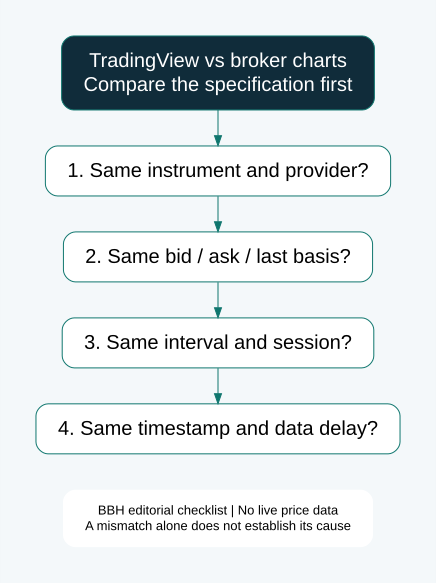
TradingView and a broker chart can show different prices because they are not necessarily displaying the same data in the same way. Compare the instrument, provider, price field, interval, session and timestamp before deciding whether a difference is expected or needs investigation.
Research updated 23 October 2026. Official-document review and original calculation examples; no connected broker account or proprietary live feed audited.
Why is my broker chart different from TradingView?
Start with product identity rather than the shape of a candle. An exchange-traded future, a spot quote, a CFD and a fixed-outcome contract can share a familiar asset name without being the same product. Even a symbol displayed on the same charting service may be supplied by a different venue or provider.
| Observation | Check first | Evidence to retain |
|---|---|---|
| Prices differ slightly | Provider and bid/ask/last basis. | Full symbol and price labels. |
| Candles have different highs or lows | Tick coverage, interval and bar boundaries. | OHLC values and opening timestamps. |
| One chart has extra bars | Session selection and market calendar. | Session settings and date. |
| One screen updates later | Delay labels and connection state. | Data-status notice and observation time. |
| Indicators disagree | Input series, formula and settings. | Parameters and source field. |
| Fixed-outcome result differs from another chart | Contract’s actual settlement reference. | Entry, expiry, result and server record. |
This table lists diagnostic possibilities. It does not claim that a specific platform’s discrepancy has been explained until its actual settings and records have been examined.
Bid vs ask vs midpoint vs last: compare like with like
TradingView’s execution-price explainer describes an example where bid/ask execution differs from a midpoint chart. Do not generalise that every TradingView symbol uses midpoint: identify the basis of the particular series.
Illustrative quote: bid is 1.10000 and ask is 1.10020. Their midpoint is (1.10000 + 1.10020) ÷ 2 = 1.10010. A bid chart and midpoint chart differ by 0.00010 even before considering another provider or a timestamp mismatch.
A last-traded price is another field and should not be silently relabelled as bid or midpoint. For a comparison log, create separate columns for the available fields. If the source does not disclose the basis, mark it unknown instead of inferring it from one screenshot.
Pocket Option’s Public Offer describes a terminal reference derived from bid and ask. That published description is relevant when checking its product; it does not prove equivalence with any particular external feed.
Why can two charts show different candles?
A candle summarises observations inside an interval. Changing the observations or the interval can change its open, high, low and close. The same colour is not proof of matching data, and a different colour is not proof of misconduct.
Consider two hypothetical five-minute windows. Window A covers 10:00:00–10:04:59, while window B covers 10:01:00–10:05:59. A move occurring just after 10:05 belongs only to B. Identical shared observations do not force the two aggregates to match.
| Hypothetical bar | Open | High | Low | Close |
|---|---|---|---|---|
| A: first aggregation window | 100 | 104 | 99 | 103 |
| B: shifted aggregation window | 102 | 105 | 101 | 101 |
A closes above its open; B closes below its open. These invented values illustrate aggregation, not observed TradingView or broker errors. Check actual start/end times before applying this explanation to a real case.
TradingView’s data-context documentation treats symbol, timeframe and modifications such as sessions, adjustments and chart types as part of the context. It also discusses differences among feeds and revisions. A complete comparison therefore needs more than an asset name and the word “five minutes.”
Timezone, session and daylight-saving differences
TradingView’s Supercharts settings guide describes chart configuration, including timezone selection. Record both the displayed timezone and the actual interval timestamps.
Changing a clock label does not automatically change all underlying short bars. By contrast, selecting a different session or aggregation boundary can change which observations are included. Do not blame every mismatch on timezone without checking the data.
For an original worksheet, keep date, UTC offset, session name and bar-open timestamp in separate columns. “10:00” without a date or offset is ambiguous. Check daylight-saving changes for the actual locations and date rather than assuming a fixed difference throughout the year.
Delayed data, real-time access and connection status
TradingView’s market-data guide says a paid charting plan does not automatically include every exchange’s real-time fees. It also distinguishes default US equity data from primary-exchange data. Check the actual symbol’s access and delay information; do not assume “paid plan” proves identical feeds.
A data-delay notice, an inactive browser tab and a connection interruption are different observations. Record what the screen actually says. A paused-looking screenshot alone cannot establish which condition occurred.
For connected trading, TradingView’s Interactive Brokers order-panel guide explains that broker-supplied bid/ask quotes and chart data subscriptions can have different access requirements. This example is specific to that integration; it should not be turned into a universal rule for every broker.
Heikin Ashi, chart styles and indicator differences
Check whether both screens use standard candles before comparing OHLC values. A smoothed or transformed representation should not be assumed to be a raw tradable-price record. Record the chart type rather than comparing colours alone.
For indicators, match the period, source field, smoothing method, session and amount of available history. Ask whether the value belongs to a completed candle or a currently changing candle. A moving-bar signal and a closed-bar signal are different observations.
Illustrative calculation: a three-value average of 10, 11 and 12 equals 11. If another series supplies 10, 11 and 15, the same formula gives 12. A formula can be identical while the result differs because the input differs. This is arithmetic, not evidence of trading accuracy.
Review our OHLC explanation and one-minute candle guide before comparing indicator behaviour near a bar close.
Can TradingView show the same Pocket Option or Quotex OTC chart?
Do not assume an exact match without documented product and feed identity. A normal currency-pair symbol, a similarly named crypto market or a community indicator does not establish that it reproduces a broker’s OTC series.
For OTC-labelled contracts, first record the full suffix and requested settlement source. Then decide whether the external chart is a comparable reference, general market context or a different product altogether. Keep these roles separate in the worksheet.
The OTC research hub discusses the broader topic. This article addresses chart diagnostics and does not claim access to a proprietary OTC quote generator.
A chart mismatch and a disputed settlement are separate investigations
Quotex’s Trading Operations Rules describe its server reference and the advisory status of terminal charts. Those terms identify the provider’s position; they do not replace examination of a specific transaction.
Save the contract ID, accepted opening value, exact expiry, closing value, result and relevant agreement version. Add an external chart only with its complete symbol, provider, price basis and timestamp. A screenshot missing those labels is weak evidence of equivalence.
Ask a concrete question: “Which server record and settlement provision determined contract [ID] at [timestamp]?” If the response supplies a record, compare it with the stated rule. If it does not, preserve that gap rather than inventing the missing data.
A fixed-outcome expiry can occur inside a candle. Its result should not be reconstructed from that candle’s eventual close unless the contract explicitly uses that value. Likewise, an order-click timestamp and server acceptance timestamp should not be silently treated as identical.
A repeatable comparison worksheet
- Record the exact research question and observation window.
- Capture complete symbol/provider labels on both platforms.
- Match price basis, interval, session and chart type where possible.
- Write down data-delay labels and connection status.
- Compare timestamped numerical values, not just screenshots.
- Separate completed bars from live bars.
- Keep unexplained discrepancies visible in the record.
- Report the limits before using the dataset to evaluate a strategy.
Do not discard inconvenient observations simply to improve a claimed win rate. If the series cannot be matched, report that finding and avoid describing the result as a same-feed execution test. Demo observations can validate the worksheet without requiring a deposit.
TradingView vs broker charts: FAQs
Which chart is more accurate?
Accurate for which product and purpose? Identify the intended reference before choosing a winner. A useful analysis chart is not automatically a contract’s settlement authority.
Does buying real-time data fix every difference?
No. It can address an access or delay issue for a specified feed, but it does not make a different instrument, price basis or session identical.
Does one different wick prove manipulation?
No. Preserve the observation and investigate its source. Conversely, a generic “feed difference” explanation should not end an enquiry without checking the actual evidence.
Can I use a TradingView signal directly for a short-expiry contract?
A signal does not establish feed equivalence, accepted entry or future profitability. Identify the reference and test the observation method before drawing performance conclusions.
Sources and research scope
Primary documentation checked 23 October 2026 is linked beside the relevant findings: TradingView execution-price, data-context, chart-settings, market-data and Interactive Brokers support pages, plus Pocket Option’s Public Offer and Quotex’s Trading Operations Rules. Provider documentation is not an independent feed audit.
All numerical examples are hypothetical teaching exercises. We did not inspect a funded broker integration or verify a pricing-success rate. Read our methodology and broker safety checklist for evidence standards.
Risk: A charting tool does not guarantee execution, payment or profit. Fixed-outcome contracts can lose the full stake.