


We may earn a commission through these partner links. Demo funds are virtual; access and country eligibility depend on the platform terms. Disclosure
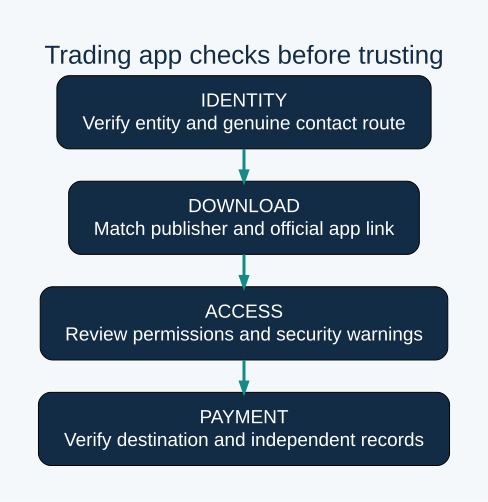
A familiar logo, convincing profit screen or high app-store rating does not establish that a trading app belongs to the company it claims to represent. Check the publisher, download route, account destination and payment instructions before entering credentials or granting access.
This checklist separates app identity, device security and financial authorisation. Official Google, FCA and SEBI guidance was checked on 24 October 2026. Passing one check does not automatically answer the other two.
Verify the claimed company before trusting the app
Begin with an independently established provider address. Do not let the same unsolicited message supply the website, app, support number and proof of authorisation; those references may all lead back to one impersonator.
The FCA’s clone-firm guidance explains that scammers can copy genuine company names, addresses or reference numbers while changing contact details. For a UK authorisation claim, it recommends checking the firm, its permitted service and the contact details through its own checking tools.
Apply the same evidence principle to other jurisdictions using the appropriate official records. A corporate registration, a financial permission and a particular app’s relationship to the company are separate questions. Do not treat a logo or certificate screenshot as an independent lookup.
Compare the genuine app link and publisher
- Open the verified provider route independently.
- Follow its current app link and inspect the actual store destination.
- Compare the publisher, support details, privacy-policy domain and app identifiers where shown.
- If anything differs, verify it through a separately trusted contact before installing or signing in.
- Record the listing URL and date so later changes can be identified.
A publisher name can legitimately differ from a consumer brand, but that difference needs a verifiable explanation. Likewise, a similar-looking app name is not proof that it belongs to the intended provider.
A forwarded APK bypasses some of the context a store listing supplies. Do not install one simply because an adviser calls it a special institutional version. A direct download needs a verified supported distribution route and a clear reason; familiarity with the sender is insufficient.
A secure-looking app is not proof of an authorised financial offer
Educational evidence comparison. Regulatory dates are sourced; any app or payment examples are fictional and are not real platform screenshots.
A. Device-security evidence
Verify the genuine supplier and listing rather than relying on a forwarded link.
Match each requested permission to the function you intend to use.
Keep the genuine supplier’s support and security information.
An app-store listing, malware scan or familiar icon does not establish financial authorisation or withdrawal reliability.
B. Financial identity and offer evidence
Who actually provides the account and financial service?
Check the relevant permission and product restrictions, where applicable.
Authenticate the actual recipient and keep transaction references.
These questions need separate evidence from device-security checks. A professional interface or balance display cannot answer them by itself.
This is a conceptual checklist, not an accusation about a named app or a recommendation to install an unverified file. Do not supply passwords, payment credentials or remote access to an unverified support contact.
Review permissions by purpose, not by blindly accepting
| Request | Question before granting it |
|---|---|
| Camera | Is this the expected document or live verification step in the genuine service? |
| Photos or files | Can the requested task use selected files rather than unnecessary broad access? |
| Notification access | Could this expose sensitive messages, and why is it required? |
| Accessibility or device control | What specific feature needs this level of interaction? |
| Screen sharing or remote control | Who can see or operate banking and trading activity? |
| Unknown-app installation | Is the distribution route independently verified? |
A permission request alone does not prove maliciousness. Evaluate its scope, purpose and timing. A camera request during a genuine verification flow differs from a demand for remote control while you enter banking credentials.
If an unexpected permission appears after an update, verify the change instead of assuming that previous trust covers every later request. Do not approve access merely to make an unexplained warning disappear.
Keep Android protections active
Google says Play Protect checks apps at installation and scans devices for potentially harmful behaviour, including apps from other sources. It may warn, disable or remove harmful software and can block some unverified apps using sensitive permissions.
Google recommends keeping Play Protect enabled. Its help page describes checking the setting through Play Store, profile, Play Protect and settings. Menu names may vary by device or version.
A clean scan is not a financial licence, a guarantee of future safety or proof that a displayed investment exists. Technical malware detection and the legitimacy of a trading business answer different questions.
Profit screens and a first payout are not sufficient proof
SEBI’s fake-trading-app awareness material describes a pattern involving social-media invitations, fabricated expertise, apparent profits, pressure for more money and blocked withdrawals. It flags unverified app links, third-party payment destinations and unrealistic return promises, and directs investors to official app checks.
These are warning patterns, not a finding that every app with a delayed withdrawal is fraudulent. Evaluate the actual records. A screen can display a number without proving an executed market trade, and a small initial payment does not guarantee later access to a larger displayed balance.
For example, a fictional app shows a 10,000-unit profit but only provides screenshots generated within itself. There is no independent execution record or receiving payment evidence. The number alone cannot establish that 10,000 is an available external cash balance.
Check payment instructions independently
Compare the destination details displayed in the genuine service with those supplied by a caller or group administrator. If they differ, stop and verify through a separately trusted channel. Do not explain away a personal account as an “official collection account” without evidence.
Preserve beneficiary name, transaction reference, amount and date privately. A successful debit from your bank proves money left that account; it does not establish that the advertised investment was purchased or that the receiving party was the claimed broker.
If you already installed a suspicious app
- Stop interacting with the suspicious service and avoid further payments.
- If someone is controlling or viewing the device, end the session and use a separate trusted device for account-security actions.
- Preserve relevant app details, download source, messages and payment references where safe; do not keep using the app merely to collect more evidence.
- Secure exposed accounts through genuine channels, change compromised passwords and review sessions and authentication settings.
- Use the operating system’s security guidance to remove suspicious software and review granted access.
- Contact the payment institution promptly if money or payment credentials may be affected.
If a password was reused, secure the other affected accounts too. Never relay an OTP or recovery phrase to a person offering help. An unsolicited recovery app can repeat the original problem under another name.
Where to report an app or suspected financial fraud
Report an impersonating listing through the relevant app store’s reporting route, preserving the listing identifier. Contact the genuine company if its identity is being misused. A store report and a payment investigation are different processes.
For suspected cyber financial fraud in India, SEBI’s awareness material points to cybercrime.gov.in and 1930. Report promptly and retain acknowledgement details. In other countries, use the appropriate official fraud-reporting and financial-authority routes. Reporting cannot guarantee repayment.
Frequently asked questions
Is every trading APK fake?
No. Distribution format alone does not settle identity, but an unverified installation link is insufficient evidence to trust the software.
Does an app-store listing prove authorisation?
No. Verify the exact entity, service and jurisdiction separately from the software listing.
Can a copied licence number look genuine?
Yes. The FCA describes clone firms using genuine firms’ details. Match the actual contact route, not only a number.
Should I pay a fee to unlock the profit screen?
Verify the demand independently before sending anything. A displayed balance does not establish a valid debt or a recoverable investment.
Official sources and related guides
- Google Play Protect capabilities and settings.
- FCA clone-firm checks.
- SEBI fake-trading-app warning.
Related: Trading app research hub · Payments research hub · Verification research · Research methodology.
Scope: Checked 24 October 2026. This checklist helps evaluate evidence; it does not certify an app, provider or product as safe.